
Parsing XML File in Python
SummaryA brief introduction to XML. Then shows how to parse XML file in Python.
Basics of XMLXML stands for Extensible Markup Language. It is a way of describing data. The basic construct of XML looks like this:
<tag attribute="val">data</tag><tag> is called the opening tag. The openning tag can contain optional attribtes.
</tag> is called the closing tag.
Anything between the openning and closing tag is content or value. The content can be a simple string, more tags and sub tags or empty.
Let's look at a simple XML file.
<?xml version="1.0" encoding="utf-8"?>
<students>
    <note>List of students</note>
    <student name="John" sex="M" year="6" class="alpha" />
    <student name="Mary" sex="F" year="6" class="beta" />
    <student name="Bob"  sex="M" year="7" class="cedar" />
    <student name="Tony" sex="M" year="7" class="cedar" />
    <student name="Julie" sex="F" year="7" class="ash" />
</students>
An XML file must contain the version as the first line. It is also a tag but has no closing tag.
In the above example, <students>, <note>, <student> are tags. </note> is a closing tag. An XML file must have one root tag. In the above example, <students> is the root tag. An XML structure represents an tree structure, see picture below. So, sometimes, a tag is also called a node. In programming, it is also referred as "element".

The content between the tag and the closing tag is the value. Therefore, in <note>List of students</note>, "List of students" is the value..
A tag can contain optional attributes. Tag <note> has no attributes. Tag <student> has 4 attributes, namely "name", "sex", "year" and "class".
Reading XML FilesDownload a copy of the above XML file student.xml. Place the file in C:\temp\student.xml. It will be needed for this exercise.
- Start Visual Studio 2010
- Create a new project: [File] -> [New Project] ->[Other Languages] ->Python -> [Python Application]
- Give the application name "ReadXml"
- Click [OK]
- In ReadXml.py file, type the following:
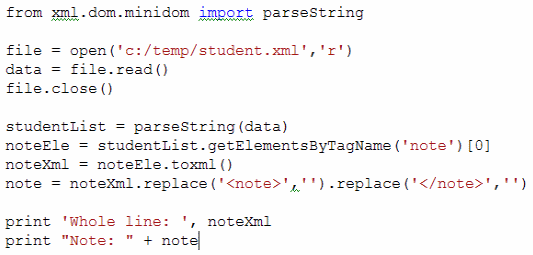 download source
 - Run the program (Shift+Alt+F5)
Whole line: <note>List of students</note>
Note: List of students
>>>
Some explanations:
- parseString() - Converts the XML string into an tree object called DOM(dynamic object model).
- getElementsByTagName() - returns an array of XML elements with the specified tag name. In the above code, the tag name is "note".
- toxml() - convert the element into the original xml string. In this example, it converts to "<note>List of students</note>"
1. Get All Students Names and Sort
studentList = parseString(data)

# get array of all students

allStudents = studentList.getElementsByTagName('student');

# print names of all students, unsorted

for s in allStudents :
    print s.getAttribute('name');

# print names of all students, sorted

sortedNames = []
for s in allStudents :
    sortedNames.append(s.getAttribute('name'));

sortedNames.sort();
print
print 'Names sorted:'
for name in sortedNames :
    print name
Results :
John
Mary
Bob
Tony
Julie

Names sorted:
Bob
John
Julie
Mary
Tony
>>>
2. Get All Year 7 Student Names and Sort
studentList = parseString(data)

# get array of all students

allStudents = studentList.getElementsByTagName('student');

# print names of all year 7 students, sorted

sortedNames = []
for s in allStudents :
    if(s.getAttribute('year') == '7') :
        sortedNames.append(s.getAttribute('name'));

sortedNames.sort();
print 'All year 7 students:'
for name in sortedNames :
    print name
Results :
Bob
Julie
Tony
>>>